
Send Serbian e-invoices straight from Excel, without retyping
Current version: 2.03
What SEF is, if you are not from Serbia
SEF (Sistem elektronskih faktura) is Serbia's national e-invoicing system. Every company and entrepreneur registered in Serbia must issue and receive invoices through it, in the UBL XML format, and public-sector customers accept nothing else. If you run a Serbian company, a branch office or a local entity, this applies to you as well, no matter where the head office is.
Most accounting packages can do it, but they make you keep the invoice inside their system. This add-in does the opposite: the invoice stays in your Excel sheet, in the layout you already use, and one button sends it to SEF.
It also comes with an invoice template that is easy to adapt to your own workflow, printing and PDF export, and a script for the totals across all the invoices you create.
Note: the add-in runs only in the desktop Excel application (Microsoft Excel for Windows) and will not work in Excel on the web. It also runs on Windows 7 if the Office installation is compatible.
What it solves
Less manual work
The data is read from the cells and columns you already use in Excel, without constantly moving between systems.
A faster SEF process
One click sends the invoice, returns the SEF number, checks the status and downloads the XML or PDF when you need it.
Control and compliance
Mapping settings and the update period keep the tool aligned with changes on the SEF side.
Key features
The list follows the ribbon interface and the user manual as they are today.
SEF operations
- Send an invoice (UBL XML from the active sheet)
- Check an invoice by its SEF number
- Download XML and download PDF
- Cancel an invoice and issue a credit note
- Show invoice changes by date
Comes with a built-in invoice template
- A ready-to-use invoice template,
Invoice.xltm - The template is easy to change and adapt to your needs
- Export the page to PDF
- Print the invoice directly from Excel
- Add the NBS IPS QR code for payment
- Apply the local decimal separator
- The SEF number is written into the designated cell after a successful send
Settings and customisation
- Mapping
Cells__*,Rows__*andColumns__*onto your own Excel layout - A built-in editor for mapping cells between your Excel template and the SEF elements
- Constant XML values through
Values__* - SEFProcessor API endpoint and key
- Paths for PDF export and opening
Licensing and extra automation
- The licence is tied to one computer (1 activation)
- Additional computers are charged per installation
- A script that shows the totals across all invoices created
- Maintenance can be extended after the period expires
Supported today
- A standard outgoing invoice with multiple line items
- VAT per line item (0%, 10%, 20%) with automatic grouping into
TaxSubtotal - VAT-exempt invoices (0%) with the matching category and reason for exemption
- Attachments per line item: URL and PDF
- Invoices to the public sector through JBKJS, when that field is filled in
- Advance payments (
PrepaidAmount) with automatic calculation ofPayableAmount - Sending to SEF, checking the status and downloading XML or PDF
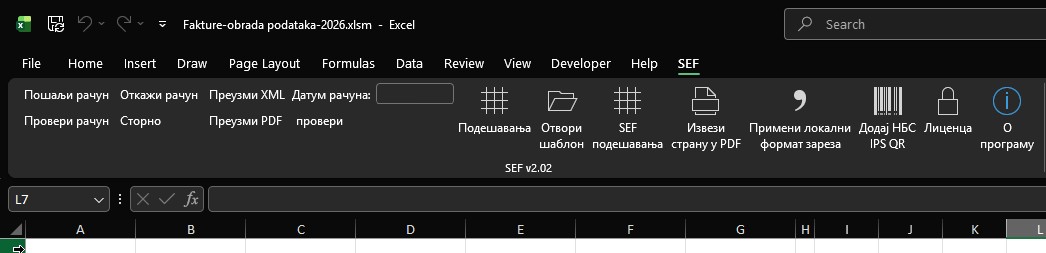
How the add-in looks in Excel
The ribbon group after installation:
How the workflow looks
1. Installation
Download the add-in, unblock the file, install the version that matches your Office (32-bit or 64-bit) and enable the add-in under COM Add-ins.
2. Licence activation
The licence key arrives at the email address you gave when ordering. Enter that address and the key in the add-in.
3. Connecting to SEF
Sign in to your SEF portal, enable API access, copy the API key and save it in the add-in settings.
4. Preparing the data
Open the template or your own layout, check the cell and column mapping and set the path for ExportToPDFFile.
5. Creating the invoice
Create your invoice and fill in everything that invoice requires.
6. Sending and tracking
Click „Send invoice", then „Check invoice", and download the XML or PDF documents when needed.
Price
A single offer: a licence for one computer (1 activation) with 1 installation included. The price is in Serbian dinars.
SEF Excel desktop add-in
8.000 RSD
- Licence for 1 computer (1 activation)
- 1 installation included (1 computer)
- 3 months of bug fixes and SEF compliance updates
Frequently asked questions
Cells__*, Rows__* and Columns__* values are mapped onto your layout.Ready for a faster SEF process?
Order now and start sending invoices from Excel.
The desktop add-in licence is available immediately.
Leave a Comment