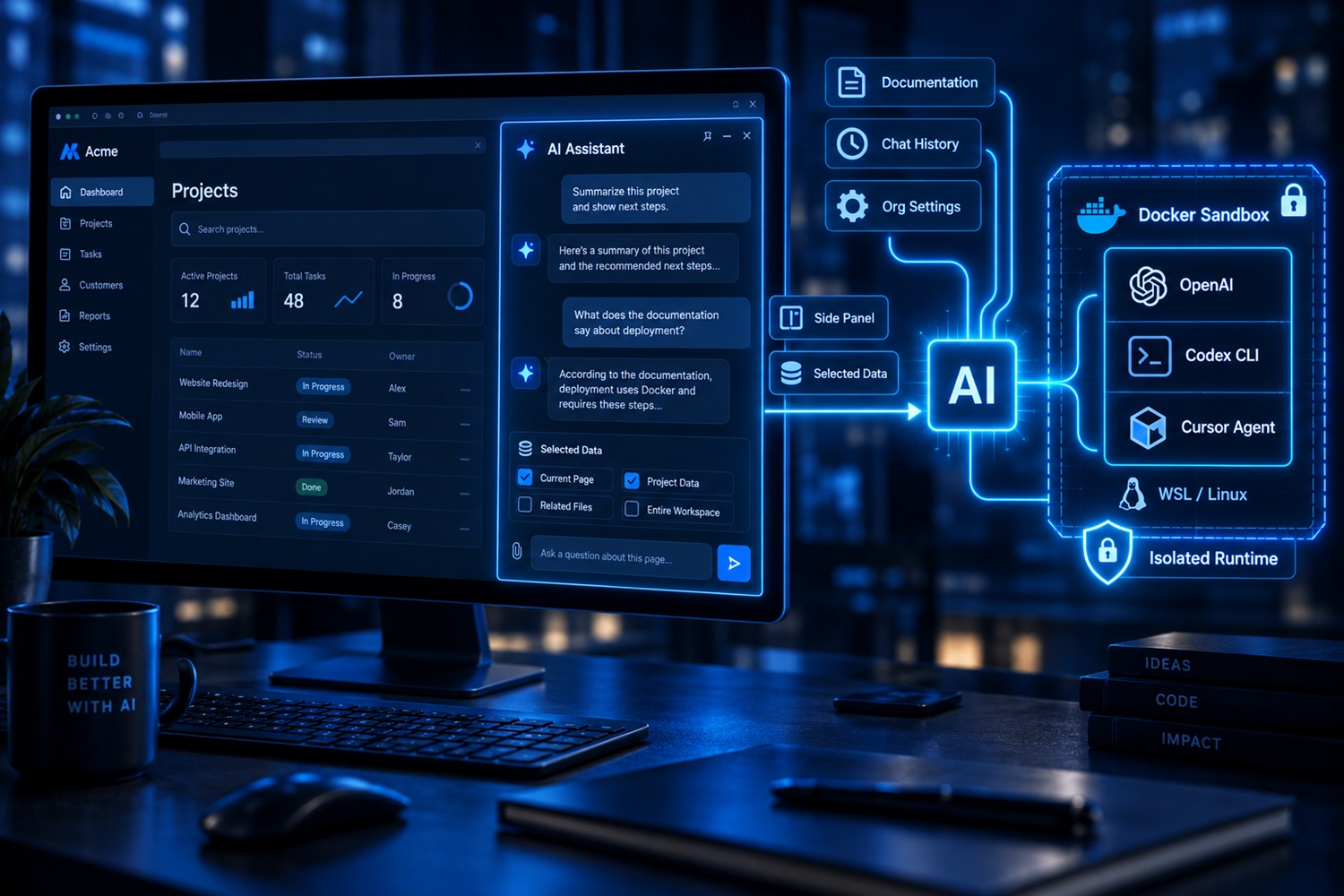
AI assistant in a web application sits beside every screen of a business system and answers questions using its documentation. The same panel can use the OpenAI Responses API or run Codex and Cursor agents in Docker, giving users one consistent workflow without locking the application to a single provider. In practice it is a documentation assistant inside the application.
What was built
An assistant that sits beside every screen of the CacaTajka business web system and answers questions about working in the application. What sets it apart is not that it talks to a language model, but what can stand behind it: besides the usual connection to OpenAI, the same panel can run a real command-line agent — Codex or Cursor — executing inside a Docker container on WSL or a Linux server.
Nothing changes for the user. Which engine is used is chosen in the organization's settings.
What the client gets
- Help where the work happens – the panel sits beside every screen, with no switching to another page and no training required.
- Answers from their own documentation rather than generic answers from the internet. When the documentation does not contain the answer, the assistant says so instead of inventing one.
- Conversation history that is kept, continued and can be downloaded as a document.
- Independence from a single supplier – when an agent gets more expensive, loses quality or shuts down, the engine changes, not the application.
The data stays under the user's control
The assistant does not read the screen on its own. Every screen can offer fields that might help it, the user picks them with checkboxes, and sees the exact content that will be sent before sending it. Nothing leaves quietly.
On the server side, the forwarded content is treated as data and never as an instruction — a safeguard against attempts to slip a new instruction to the assistant through text on the screen. History is kept separately per organization and per user.
Why the container is part of the solution, not a detail
A command-line agent can read files and run commands. For it to work without a person confirming every action, it has to be bounded by something else — and that is the container's job. The agent sees only its own environment, the documentation and the working area of that conversation; the application's files, the database and the rest of the server are out of reach.
On top of that, every conversation gets its own separate area, and every run is recorded with its duration and outcome, so it can be established afterwards what happened and when.
Which agents can stand behind the panel
The runner knows nothing about any particular agent: it hands over the task, runs it in a container and reads the answer. That is why it can serve any agent that packages into a container and can work non-interactively.
In production: the OpenAI Responses API, Codex CLI and Cursor Agent — implemented, tested and in use.
Planned: Claude Code, Gemini CLI, GitHub Copilot CLI, Amazon Q Developer CLI, Goose, Aider, opencode and Crush. They all work on the same principle, so each one only needs its own environment added — everything else is shared and is not written again.
The part of the work that is not visible
Alongside the connection itself, the environments the agents are packaged into were built as well: signing in is done once and never ends up in the code, the update to a newer agent version runs at night on its own with the option of going back to the previous one, and after every change to the environment a check immediately shows whether the agent answers at all.
That is also where most of the surprises were: running tools like these in a container on a Windows host runs into limitations that are not in the documentation, and the way around them had to be found along the way.
The same solution outside this application
The panel is a single JavaScript module with no framework dependency, and the server side is one entry point that takes a question and returns an answer. Because of that split, the same assistant can be attached to another website, to a program that gets installed, or to a job running in the background, without writing the connection to the agent again.
Technologies used
The solution was built in PHP (CodeIgniter 4) and JavaScript, with the OpenAI Responses API, the Codex and Cursor CLI agents, Docker on WSL and Linux, MySQL for conversation history and the run log, and Bootstrap for the panel itself.
If you need a connection like this in your own software, see the artificial intelligence integration service, and for the connection to a third-party service itself, API integrations.
Leave a Comment